

Your Rules. A Clearer Process.
Bring coverage, work commitments and requests together. Review and adjust before publishing.
Physician & Anesthesia Scheduling
Build schedules around your department’s needs, share the workload fairly, and give staff more say in their working day with Mobile Picklist.
Your schedule, your choice.
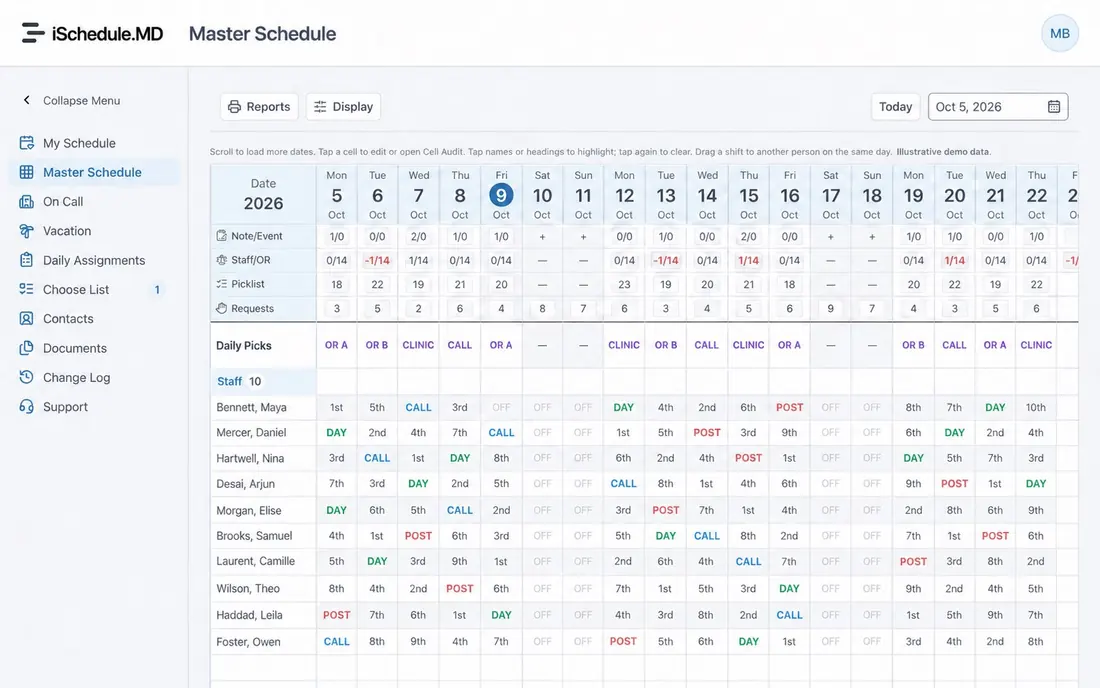
Bring coverage, work commitments and requests together. Review and adjust before publishing.
Make the distribution of call, weekends and workload easier for your group to understand.
Give staff a clear turn to choose the work that shapes their day.
Mobile Picklist
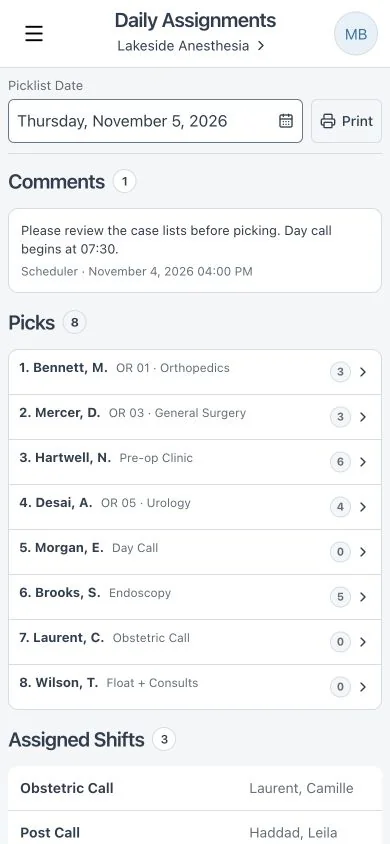
Review the work and choose your assignment from your phone. No paper list to track down or pass around.
See room and case details, receive a notification when it’s your turn, and make your choice. The picklist moves on automatically, keeping completed assignments clear for everyone.
Review the available work and make your choice.
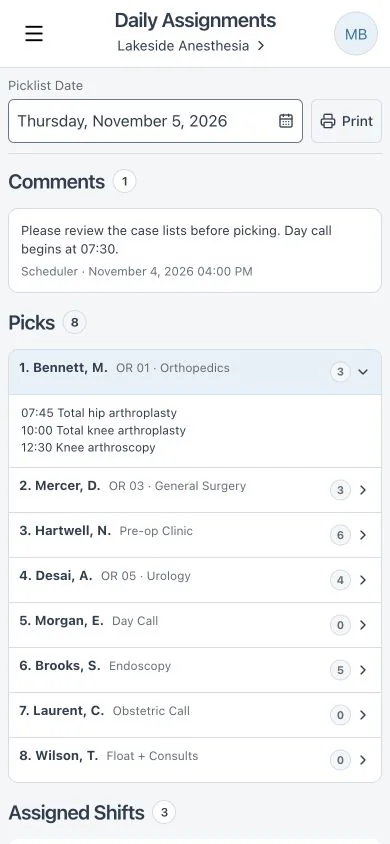
See the assignments and preparation details.
Notifications follow your group’s pick order.
Your choice is recorded and the next person is notified.
Available
Available
Available
Up next: Dr. Jamie Patel
Take a Look Around
Whether you make the schedule or work it, see what iSchedule.MD could bring to your day.
Explore the staff experience on a phone and the shared schedule on desktop. Bring something concrete to your chief, scheduler and colleagues.
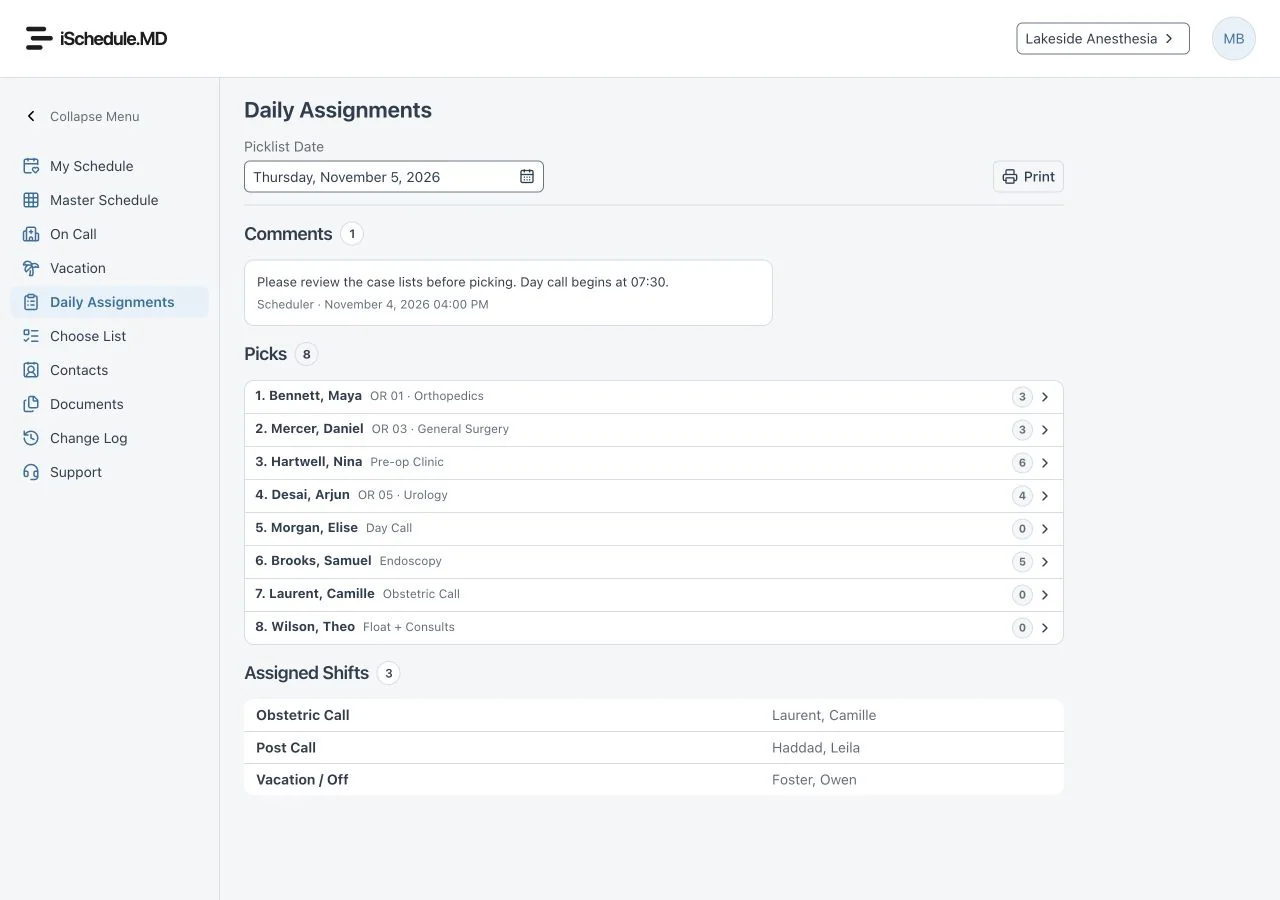
See your group’s assignments together.
See available work and completed choices.
See case preparation before making your choice.
Fictional demonstration names and assignments.
The iSchedule.MD
Scheduling Engine
Built Around Your Department
Work commitments, requests, call patterns and recovery time all need a place in the schedule.
Rubix² brings your requirements into the schedule-building process. Your scheduler reviews the result, makes adjustments and decides when it is ready to publish.
Daytime work, overnight call and weekends.
Different workloads for different work agreements.
Time off and preferences alongside coverage.
Call patterns, recovery and demanding assignments.
Everyday Benefits
For schedulers, fewer details to chase. For staff, knowing what’s ahead and having a voice in the work they do.
Review call, weekends and assignments with fairness reporting. Give your group a clearer basis for discussing workload.
Keep availability, time-off requests and shift changes together, where they belong.
Review available work, receive your turn notification and choose your assignment wherever you are.
Share your schedule with your calendar so upcoming shifts are easier to plan around.

Meet Occam
Occam is our AI assistant, helping us investigate support reports and prepare clear, useful responses.
Human review stays part of the process. Customer replies are reviewed, and proposed fixes need approval before they are carried out.
From Our Founder
A schedule looks simple on paper.
Living with it is another matter.
As an anesthesiologist, I knew that call could mean 24 stressful hours away from home. Recovery time, family life and satisfaction at work depended on how that burden was shared.
Daily assignments had an ugly side too. A chief could use the schedule to punish someone, assigning them two weeks in the clinic to make a point or assert authority. Meanwhile, some staff would hog the best assignments, leaving others with the less desirable work. Your room affected your income, your stress, who you worked with and when you got home. The resentment was real.
My chief came up with the picklist idea: give staff a clear turn to choose their work. I built the first paper picklist for my own hospital in 2003. It brought that choice into a system with transparent rules the scheduler could oversee and enforce. Fairness needed more than good intentions.
In 2014, that paper process became Mobile Picklist. Now, in 2026, we’re incorporating AI to ease the burden on schedulers and staff while respecting individual needs. The purpose hasn’t changed: share the work fairly and give physicians more say in their working lives.
Experience You Can Build On
iSchedule.MD has supported hospital groups since 2014, including large groups of 60 staff working across multiple hospital sites.
Choosing a scheduling system is a long-term decision. You need confidence in the software, the support behind it and what it will cost to keep using it.
Hospital Integration Experience
We’ve integrated with surgical-booking systems including Epic, Cerner and MEDITECH.
Bring room and case details into Mobile Picklist so staff can review the work before choosing. Setup is tailored to the reports and workflow available at your hospital.


Logos identify systems we have integrated with. No endorsement is implied.
Bring Your Group With You
Your colleagues worry about learning a new system. Your scheduler thinks about setup. Your chief needs to understand the cost and ongoing support.
Explore the staff and desktop views. Invite your scheduler, chief and colleagues to a 30-minute demo.
Share an estimate with first-year pricing, renewals, optional integration and applicable taxes clearly identified.
Review your staff, rules and preferred start date together. Standard setup and scheduler training are included.
Transparent pricing
First-year prices, renewal rates and optional extras are here for your whole group to review. You don’t need to book a demo to find out what iSchedule.MD costs.
A lower first-year price to help your group make the switch. Available to all new groups, whether you use another platform, spreadsheets or a manual process.
$225$165per physician for the first year
$450$330 per physician/year from year two.
$275$200per physician for the first year
$550$400 per physician/year from year two.
No additional fee for standard setup and scheduler training.
Per agreed booking-system interface. Includes hospital IT coordination, configuration, import testing and handover.
Separate from standard setup and the first-year discount. Additional interfaces or substantial custom work are quoted separately before work begins.
We want to earn your group’s trust for the long term, with scheduling you enjoy using and support to help you get started.
Questions Before You Switch
Disruption, group agreement, cost and ongoing support deserve clear answers.
We’ll review your scheduling rules, staff setup and preferred start date with you. Standard setup and scheduler training are included, so your scheduler has help preparing the change.
Share your estimate and invite colleagues to a 30-minute demo. Schedulers, chiefs and staff can see the system together and ask questions about how it would fit your group.
Our pricing is public. Your estimate separates the subscription, first-year discount, optional hospital integration and applicable taxes. Anything requiring a separate quote is identified clearly.
iSchedule.MD has supported hospital groups since 2014, including large groups of 60 staff working across multiple hospital sites. We continue to develop the system around the practical needs of schedulers and staff.
No. Room and case lists can be entered manually. An optional hospital connection can automate that preparation for Mobile Picklist.
Your Schedule, Your Choice.
See how iSchedule.MD could work for your group. Bring your scheduling frustrations, your questions and the people who need to be part of the decision.